The steps for configuring a data source for connecting to a PostgreSQL server are as
follows:
-
Open the
Preferences dialog box and go to .
-
Click the
 New button in the
Data Sources panel.
New button in the
Data Sources panel.
The dialog box for configuring a data source is opened.
Figure: Data Source Drivers Configuration Dialog Box
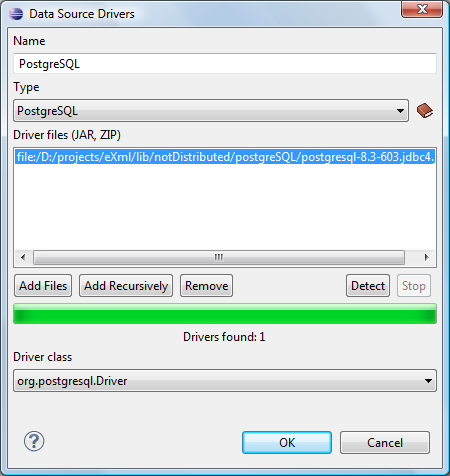
Figure: Data Source Drivers Configuration Dialog Box
-
Enter a unique name for the data source.
-
Select PostgreSQL in the driver Type drop-down
list.
-
Add the PostgreSQL driver file using the Add Files button.
The PostgreSQL driver file is called
postgresql-8.3-603.jdbc3.jar. The
Driver files
section lists
download links for
database drivers that are necessary for accessing PostgreSQL databases in
Oxygen XML Developer plugin.
-
Select the most appropriate Driver
class.
-
Click the OK button to finish the data source
configuration.
