The Quick Assist support helps you to rapidly access search and refactoring actions. If one or more actions are available in the current context, they are accessible via a yellow bulb help marker placed on the cursor line, in the editor line number stripe. Also, you can invoke the Quick Assist menu if you press Alt + 1 keys (Meta + Alt + 1 on Mac OS X) on your keyboard.
Two categories of actions are available in the Quick Assist menu:
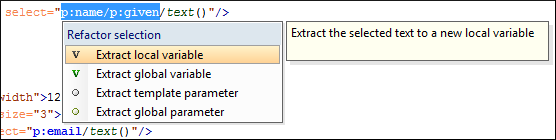
- Actions available on a selection made inside an attribute that contains an XPath
expression:
-
 Extract
template - Extracts the selected XSLT instructions sequence into a
new template.
Extract
template - Extracts the selected XSLT instructions sequence into a
new template.
-
 Move to
another stylesheet - Allows you to move one or more XSLT global
components (templates, functions, or parameters) to another stylesheet.
Move to
another stylesheet - Allows you to move one or more XSLT global
components (templates, functions, or parameters) to another stylesheet.
- Extract local variable - Allows you to create a new local variable by extracting the selected XPath expression.
- Extract global variable - Allows you to create a new global variable by extracting the selected XPath expression.
- Extract template parameter - Allows you to create a new template parameter by extracting the selected XPath expression.
- Extract global parameter - Allows you to create a new global parameter by extracting the selected XPath expression.
Figure: XSLT Quick Assist Support - Refactoring Actions
-
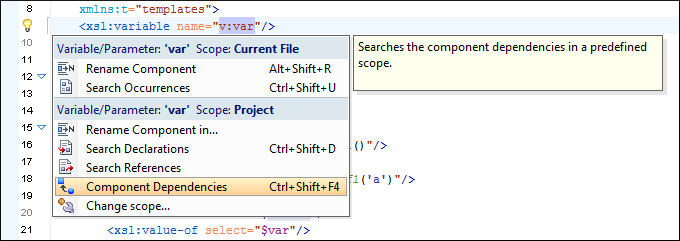
- actions available when the cursor is positioned over the name of a component:
 Rename Component
in
Rename Component
in- Renames the component and all its dependencies.
 Search
Declarations
Search
Declarations- Searches the declaration of the component in a predefined scope. It is available only when the context represents a component name reference.
 Search
References
Search
References- Searches all references of the component in a predefined scope.
 Component
Dependencies
Component
Dependencies- Searches the component dependencies in a predefined scope.
 Change
Scope
Change
Scope- Configures the scope that will be used for future search or refactor operations.
- Rename
Component
- Allows you to rename the current component in-place.
 Search
Occurrences
Search
Occurrences- Searches all occurrences of the component within the current file.
Figure: XSLT Quick Assist Support - Component Actions