WebHelp with Feedback is a form of online help system that consists of a series of web pages (XHTML format). Its advantages include platform independence, continuous content update, and a feedback mechanism that allows your authors and audience to interact with one another through comments.
Layout
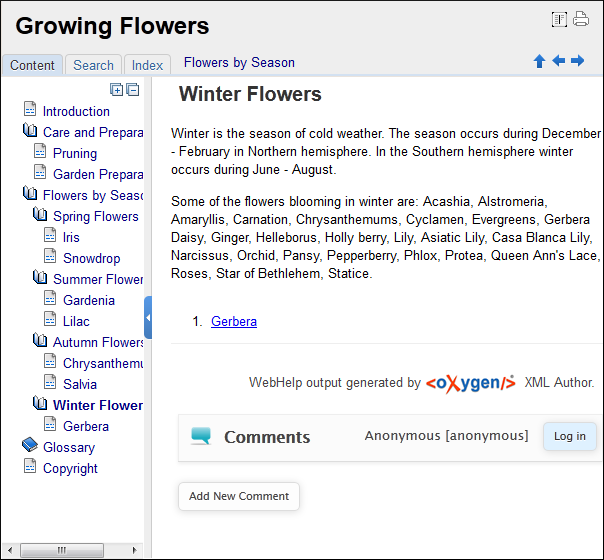
The layout of the feedback-enabled WebHelp system is similar to the layout of the basic
WebHelp and the left section is identical. However, the bottom of the right section contains
a comments bar. You can click on the Log in
button on the right side of this bar to be authenticated as a user for the WebHelp system
and your user name will be included in any comments that you add. If you do not have a user
name, you can click on the Sign Up button to create a new user. Under
the comments bar, you can click the Add New
Comment button to add a comment, regardless of whether or not you are logged
in.
Note: You can enhance the appearance of the selected item in the Table of
Contents. See the Customizing WebHelp chapter for more details.
Figure: The Layout of the Feedback-Enabled WebHelp System
After you log in, your name and user name are displayed in the
Comments bar together with the Log off and
Edit buttons. Click the Edit button to open
the User Profile dialog box. In this dialog box, you can customize
the following options:
- Your Name - You can use this field to edit the initial name that you used to create your user profile.
- Your email address - You can use this field to edit the initial email address that you used to create your profile.
- You can choose to receive an email in the following situations:
- When a comment is left on a page that you commented on.
- When a comment is left on any topic in the WebHelp system.
- When a reply is left to one of my comments.
- New Password - Allows you to enter a new password for your user
account.Note: The Current Password field from the top of the User Profile is mandatory if you want to save the changes you make.
Search Feature
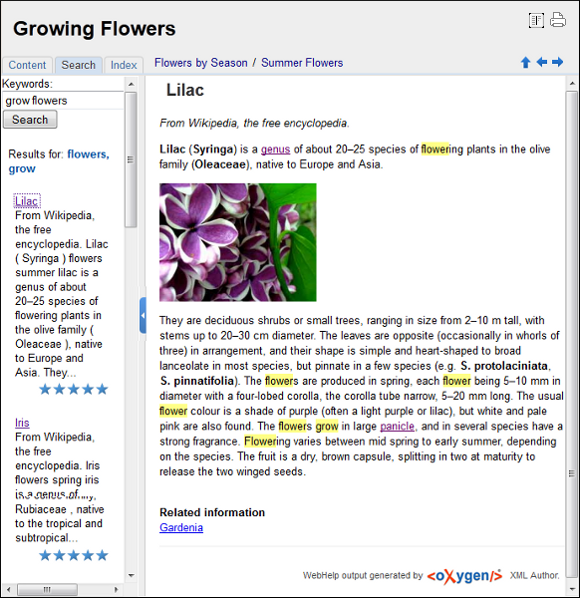
The Search feature is enhanced with a rating
mechanism that computes scores for every page that matches the search criteria. These scores
are then translated into a 5-star rating scheme. The search results are sorted depending on
the following:
- The number of keywords found in a single page (the higher the number, the better).
- The context (for example, a word found in a title scores better than a word found in
unformatted text). The search ranking order, sorted by relevance is as follows:
- The search phrase is included in a meta keyword
- The search phrase is in the title of the page
- The search phrase is in bold text in a paragraph
- The search phrase is in normal text in a paragraph
Figure: WebHelp Search with Stemming Enabled
Rules that are applied during a search include:
- Boolean searches are supported using the following operators: and, or, not. When there are two adjacent search terms without an operator, or is used as the default search operator (for example, grow flowers is the same as grow or flowers).
- The space character separates keywords (an expression such as grow flowers counts as two separate keywords: grow and flowers).
- Do not use quotes to perform an exact search for multiple word expressions (an expression such as "grow flowers", returns no results since it searches for two separate words).
- indexterm and keywords DITA elements are an effective way to increase the ranking of a page (for example, content inside keywords elements weighs twice as much as content inside an H1 HTML element).
- Words composed by merging two or more words with colon (":"), minus ("-"), underline ("_"), or dot (".") characters count as a single word.
- Always search for words containing three or more characters (shorter words, such as to or of are ignored). This rule does not apply to CJK (Chinese, Japanese, Korean) languages.
HTML tag elements are also assigned a scoring value and these values are evaluated for the search results. For information about editing these values, see the Editing Scoring Values of Tag Elements in Search Results topic.
This output format is compatible with most of the most recent versions of the following
common browsers:
- Internet Explorer (IE 8 or newer)
- Chrome
- Firefox
- Safari
- Opera
