To navigate precisely to a part of the document you are editing in the Text mode, use the Go to dialog box. To open the Go to dialog box, go to .
Figure: Go to Dialog Box
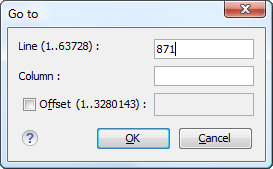
Complete the dialog box as follows:
- Line - Destination line in the current document.
- Column - Destination column in the current document.
- Offset - Destination offset relative to the beginning of document.
