To display the SharePoint Browser view, go to . This view allows you to connect to a SharePoint repository and perform
SharePoint-specific actions on the available resources.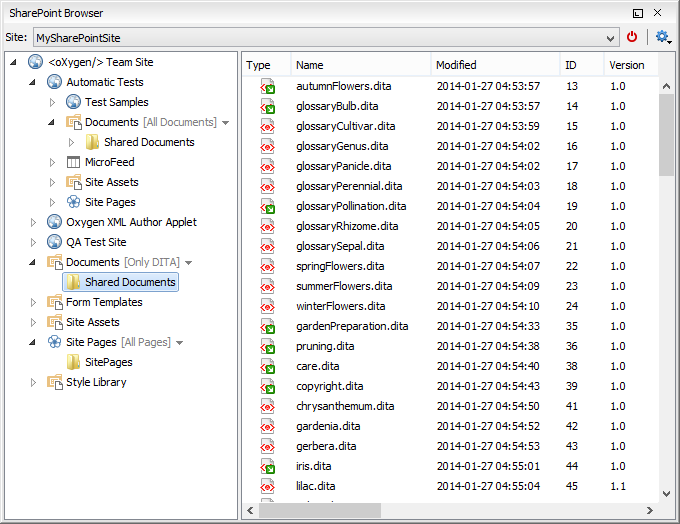
Figure: SharePoint Browser View
The view is split in several functional areas:
Connection Area
The following controls are available:
- The Site combo box allows you to select and connect to an already defined SharePoint connection.
- The
 Disconnect action terminates the current connection.
 - The
 Settings drop-down
menu contains actions that help you to quickly define a new connection or manage the
existing ones from the Data Source options page: New
SharePoint Connection and Configure Database
Sources. Also, here you can choose one of the predefined view
layouts.
Settings drop-down
menu contains actions that help you to quickly define a new connection or manage the
existing ones from the Data Source options page: New
SharePoint Connection and Configure Database
Sources. Also, here you can choose one of the predefined view
layouts.
SharePoint Site Navigation Area
If there is no connection selected in the Site combo box, this area
is left blank and promotes the actions that allow you to quickly add SharePoint connections.
Otherwise, the navigation area presents the SharePoint site structure in a tree-like fashion
displaying the following node types: sites ( ), libraries, and folders.
Depending on the type of node, a contextual menu offers
customized actions that can be performed on that node. The contextual menu of a folder allows
you to create new folders and documents, import folders and files, and to rename and delete
the folder.
Note: The rename and delete actions are not available for library root folders
(folders located at first level in a SharePoint library).
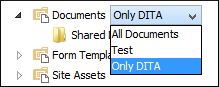
Each library node display next to its name a drop down box where
you can select the current library view. This functionality is also available on
the node's contextual menu, under the Current View submenu.
Folder Content Area
The content of a folder is displayed in a tabular form, where each row represents the properties of a folder or document. The list of columns and the way the documents and folders are organized depends on the currently selected view of the parent library.
| Action | Description | Available for | |
|---|---|---|---|
| folders | documents | ||
 Open Open
|
Displays the content of the currently selected folder. Opens the current document for editing. |
✔ | ✔ |
| Rename | Renames the current node on server. | ✔ | ✔ |
| Import | Import files or folders into the currently selected folder. | ✔ | ✔ |
 Delete Delete |
Deletes the current node from the server. | ✔ | ✔ |
| Copy Location | Copies to clipboard the URL of the current node. | ✔ | ✔ |
 Check Out Check Out |
Reserves the current document for your use so that other users cannot change it while you are editing it. | ✔ | |
| Check In | Commits on the server the changes you made to the document, so that other users can see them. It also makes the document available for editing to other users. | ✔ | |
| Discard Check Out | Discards the previous checkout operation, making the file available for editing to other users. | ✔ | |
 Refresh Refresh |
Queries the server in order to refresh the available properties of the current node. | ✔ | ✔ |
You can filter and sort the displayed items. To display the
available filters of a column, click the filter widget located on the column's header. You can
apply multiple filters at the same time.
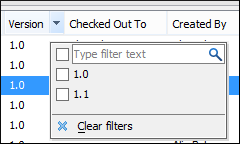
Note: A column can be filtered or sorted only if it
was configured this way on the server side.
