For types of transformation scenarios that utilize XSLT stylesheets, Oxygen XML Developer includes an integrated SVG Viewer in the results panel at the bottom of the editor. This is useful for XSL stylesheets that have the capability of producing rich SVG graphics.
To enable this feature, select in the Output tab of the XSLT transformation scenario configuration dialog box. When you run the transformation, the SVG result is then rendered in an integrated SVG viewer in the results panel.
Figure: Integrated SVG Viewer
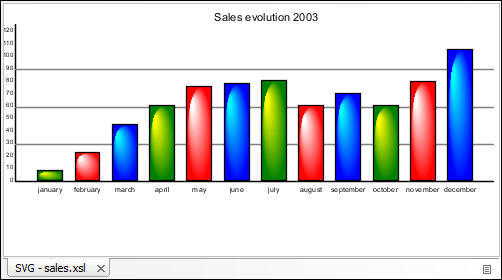
Example of a Use-Case
Suppose you have an XML document that describes the evolution of your sales over a time
period and you want to create a graphic for it. You could use the following steps to
accomplish this task:
- Start with a static SVG image, written directly in Oxygen XML Developer or exported from a external graphics tool.
- Extract the parts that are dependent on the data from the XML document.
- Create XSL templates to be applied on the XML document.
- Create an XML transformation with XSLT scenario.
- While configuring the transformation scenario, select in the Output tab of the configuration dialog box.
- Run the transformation.
The SVG image is rendered in an integrated SVG viewer in the results panel at the bottom of the editor.
