To configure the options for Messages, open the Preferences dialog box and go to . This preferences page allows you to disable the following warning messages which may appear in the application:
Figure: The Messages Preferences Panel
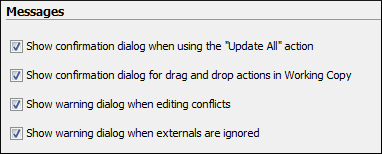
- Show confirmation dialog when using the "Update All" action - Allows you to avoid performing accidental update operations by requesting you to confirm them before execution.
- Show confirmation dialog for drag and drop actions in Working Copy - This option avoids doing a drag and drop when you just want to select multiple files in the Working Copy view.
- Show warning dialog when editing conflicts - When the Edit Conflicts action is executed, a warning dialog box notifies you that the action overwrites the conflicted version of the file created by an update operation. The conflicted file is overwritten with the version of the same file which existed in the working copy before the update operation and then proceeds with the visual editing of the conflicting file.
- Show warning dialog when "svn:externals" definitions are ignored - A warning dialog box is displayed when "svn:externals" definitions are ignored before performing any operation that updates resources of the working copy (like Update and Override and Update).
