You can customize Schematron Quick Fixes by editing them directly in the current Schematron file or in a separate file. The Schematron Quick Fixes are an extension of the Schematron language and they allow you to define fixes for Schematron error messages. You can refer the quick fixes from the assert or report elements in the values of the sqf:fix attributes.
Defining a Schematron Quick Fix
The basics of a Schematron Quick Fix
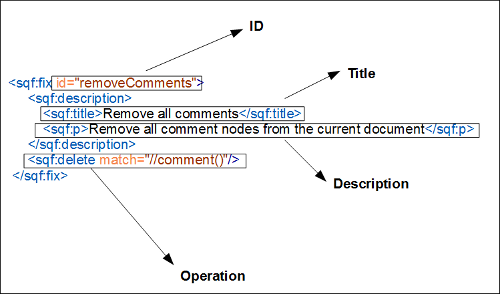
is defined by an ID, name, description, and the operations to be executed.
- ID - Defined by the id attribute from the fix element and must be unique in the current context. It is used to refer the quick fix from a report or assert element.
- Name - The name of the quick fix is defined by the title element.
- Description - Defined by the text in the paragraphs (p) of the description element.
- Operations - The following types of operations are supported:
- <sqf:add> - To add a new node or fragment in the document.
- <sqf:delete> - To remove a node from the document.
- <sqf:replace> - To replace a node with another node or fragment.
- <sqf:stringReplace> - To replace text content with other text or a fragment.
The assertion message that generates the quick fix is added as the description of the problem to be fixed. The title is presented as the name of the quick fix. The content of the paragraphs (p) within the description element are presented in the tooltip message when the quick fix is selected.
Schematron Quick Fix Operations
- Add
- The <sqf:add> element allows you to add a node to the instance. An anchor node is required to select the position for the new node. The anchor node can be selected by the match attribute. Otherwise, it is selected by the context attribute of the rule.
- The target attribute defines the name of the node to be added. It is required if the value of the node-type attribute is set to anything other than "comment".
- The <sqf:add> element has a position attribute and it determines the position relative to the anchor node. The new node could be specified as the first child of the anchor node, the last child of the anchor node, before the anchor node, or after the anchor node (first-child is the default value). If you want to add an attribute to the anchor node, do not use the position attribute.
-
Note: If you insert an element and its content is empty, Oxygen XML Developer will insert the required element content.
-
An Example of the <sqf:add> Element:
<schema xmlns="http://purl.oclc.org/dsdl/schematron"
    xmlns:sqf="http://www.schematron-quickfix.com/validator/process" queryBinding="xslt2">
    <pattern>
        <rule context="head">
            <assert test="title" sqf:fix="addTitle">title element is missing.</assert>
            <sqf:fix id="addTitle">
                <sqf:description>
                    <sqf:title>Insert title element.</sqf:title>
                </sqf:description>
                <sqf:add target="title" node-type="element">Title text</sqf:add>
            </sqf:fix>
        </rule>
    </pattern>
</schema>
- Specific Add Operations:
- Insert Element - To insert an element, use the <sqf:add> element, set the value of the node-type to "element", and specify the element QName with the target attribute. If the element has a prefix, it must be defined in the Schematron using a namespace declaration (<ns uri="namespace" prefix="prefix"/>).
- Insert Attribute - To insert an attribute, use the <sqf:add> element, set the value of the node-type to "attribute", and specify the attribute QName with the target attribute. If the attribute has a prefix, it must be defined in the Schematron using a namespace declaration (<ns uri="namespace" prefix="prefix"/>).
- Insert Fragment - If the node-type is not specified, the <sqf:add> element will insert an XML fragment. The XML fragment must be well formed. You can specify the fragment in the add element or by using the select attribute.
- Insert Comment - To insert a comment, use the <sqf:add> element and set the value of the node-type to "comment".
- Insert Processing Instruction - To insert a processing instruction, use the <sqf:add> element, set the value of the node-type to "pi" or "processing-instruction", and specify the name of the processing instruction in the target attribute.
- Delete
- The <sqf:delete> element allows you to remove any type of node
(such as elements, attributes, text, comments, or processing instructions). To specify
nodes for deletion the <sqf:delete> element can include a
match attribute that is an XPath expression (the default value is
.). If the match attribute is not included, it
deletes the context node of the Schematron rule. An Example of the <sqf:delete> Element:
<schema xmlns="http://purl.oclc.org/dsdl/schematron" queryBinding="xslt2"
    xmlns:sqf="http://www.schematron-quickfix.com/validator/process">
    <pattern>
        <rule context="*[@xml:lang]">
            <report test="@xml:lang" sqf:fix="remove_lang">
                The attribute "xml:lang" is forbidden.</report>
            <sqf:fix id="remove_lang">
                <sqf:description>
                    <sqf:title>Remove "xml:lang" attribute</sqf:title>
                </sqf:description>
                <sqf:delete match="@xml:lang"/>
            </sqf:fix>
        </rule>
    </pattern>
</schema>
- Replace
- The <sqf:replace> element allows you to replace nodes. Similar
to the <sqf:delete> element, it can include a
match attribute. Otherwise, it replaces the context node of the
rule. The <sqf:replace> element has three tasks. It identifies the
nodes to be replaced, defines the replacing nodes, and defines their content.An Example of the <sqf:replace> Element:
<schema xmlns="http://purl.oclc.org/dsdl/schematron"
    xmlns:sqf="http://www.schematron-quickfix.com/validator/process" queryBinding="xslt2">
    <pattern>
        <rule context="title">
            <report test="exists(ph)" sqf:fix="resolvePh" role="warn">
                ph element is not allowed in title.</report>
            <sqf:fix id="resolvePh">
                <sqf:description>
                    <sqf:title>Change the ph element into text</sqf:title>
                </sqf:description>
                <sqf:replace match="ph">
                    <value-of select="."/>
                </sqf:replace>
            </sqf:fix>
        </rule>
    </pattern>
</schema>
- Other Attributes for Replace Operations:
- node-type - Determines the type of the replacing node.
The permitted values include:
- keep - Keeps the node type of the node to be replaced.
- element - Replaces the node with an element.
- attribute - Replaces the node with an attribute.
- pi - Replaces the node with a processing instruction.
- comment - Replaces the node with a comment.
- target - By using a QName it gives the replacing node a name. This is necessary when the value of the node-type attribute is anything other than "comment".
- select - Allows you to choose the content of the replacing nodes. You can use XPath expressions with the select attribute. If the select attribute is not specified then the content of the <sqf:replace> element is used instead.
- node-type - Determines the type of the replacing node.
The permitted values include:
- String Replace
- The <sqf:stringReplace> element is different from the others. It
can be used to find a sub-string of text content and replace it with nodes or other
strings.Attributes for the String Replace Operation:
- match - Allows you to select text nodes that contain the sub-strings you want to replace.
- select - Allows you to select the replacing fragment, in case you do not want to set it in the content of the stringReplace element.
- regex - Matches the sub-strings using a regular
expression.Note: Regular expressions in the <sqf:stringReplace> element always has the dot matches all flag set to "true". Therefore, the line terminator will also be matched by the regular expression.
Attention: The context of the content within the <sqf:stringReplace> element is set to the whole text node, rather than the current sub-string.An Example of the <sqf:stringReplace> Element:<?xml version="1.0" encoding="UTF-8"?> <sch:schema xmlns:sch="http://purl.oclc.org/dsdl/schematron" xmlns:sqf="http://www.schematron-quickfix.com/validator/process" queryBinding="xslt2"> <sch:pattern> <sch:rule context="text()"> <sch:report test="matches(., '[oO][xX]ygen')" sqf:fix="changeWord">The oXygen word is not allowed</sch:report> <sqf:fix id="changeWord"> <sqf:description> <sqf:title>Replace word with product</sqf:title> </sqf:description> <sqf:stringReplace regex="[oO][xX]ygen"><ph keyref="product"/></sqf:stringReplace> </sqf:fix> </sch:rule> </sch:pattern> </sch:schema>
Formatting and Indenting Inserted Content
The content that is inserted by the Add, Replace, or String Replace
operations is automatically indented unless you set the value of the
xml:space attribute to preserve on the operation
element. There are several methods available to format the content that is inserted:
- xsl:text - You can use an xsl:text element to
format the inserted content and keep the automatic indentation, as in the following
example:
<sqf:add position="last-child">
    <row><xsl:text>
    </xsl:text>
        <entry>First column</entry><xsl:text>
        </xsl:text>
        <entry>Second column</entry><xsl:text>
        </xsl:text>
    </row><xsl:text>
    </xsl:text>
</sqf:add>
- xml:space - Use the xml:space attribute and
set its value to preserve to format the content and specify the spacing
between elements, as in the following
example:
<sqf:add node-type="element" target="codeblock" xml:space="preserve">
    /* a long sample program */
    Do forever
     Say "Hello, World"
    End</sqf:add>
The Use-When Condition
To restrict a quick fix or a specific operation to only be available if certain
conditions are met, the use-when attribute can be included in the
<sqf:fix> element or any of the SQF operation elements. The condition
of the use-when attribute is an XPath expression and the fix or operation
will be performed only if the condition is satisfied. In the following example, the
use-when condition is applied to the <sqf:fix>
element:
<sqf:fix id="last" use-when="$colWidthSummarized - 100 lt  $lastWidth" role="replace">
     <sqf:description>
         <sqf:title>Subtract the excessive width from the last element.</sqf:title>
     </sqf:description>
     <let name="delta" value="$colWidthSummarized - 100"/>
     <sqf:add match="html:col[last()]" target="width" node-type="attribute">
         <let name="newWidth" value="number(substring-before(@width,'%')) - $delta"/>
         <value-of select="concat($newWidth,'%')"/>
     </sqf:add>
</sqf:fix>
Executing Schematron Quick Fixes in Documents Other than the Current One
You can apply Schematron Quick Fixes over the nodes from referred documents (referred using XInclude or external entities), and you can access them as nodes in your current document.
Also, you can apply the quick fixes over other documents using the doc()
function in the value of the match attribute. For example, you can add a
new key in the keylist.xml file using the following
operation:
<sqf:add match="doc('keylist.xml')/KeyList" target="Key" node-type="element" select="Key2">
Additional Elements Supported in the Schematron Quick Fixes
- <sqf:call-fix>
- This element calls another quick fix within a quick fix. The called quick fix must be defined globally or in the same Schematron rule as the calling quick fix. A calling quick fix adopts the activity elements of the called quick fix and should not include other activity elements. You can also specify which parameters are sent by using the <sqf:with-param> child element.
- <sqf:group>
- Allows you to group multiple quick fixes and refer them from an assert or report element.
- <sqf:fixes>
- Is defined globally and contains global fixes and groups of fixes.
- <sqf:keep>
- Used to copy the selected nodes that are specified by the select
attribute. Note: In Oxygen XML Developer the copied nodes cannot be manipulated by the current or other activity elements.
- <sqf:param>
- Defines a parameter for a quick fix. If the parameter is defined as abstract then the type and default value should not be specified and the fix can be called from an abstract pattern that defines this parameter.
- <sqf:user-entry>
- Allows you to specify a value that will be inserted after the user selects the quick fix. If multiple user-entry elements are defined, Oxygen XML Developer will display a dialog box for each one, in which the user can insert values.
Other SQF Notes
Note: The sqf:defaultFix attribute is ignored in Oxygen XML Developer.
For more details on editing Schematron Quick Fixes, go to: Schematron Quick Fix Specifications
