Setting up a Floating License Server Running as a Java Servlet
Setting up the floating license server as a servlet.
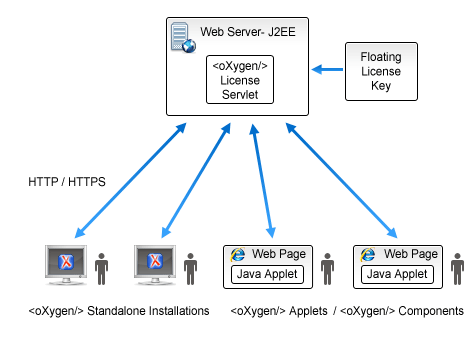
- Make sure that Apache Tomcat 5.5 or higher is running on the machine you have selected to be the license server. To get it, go to http://tomcat.apache.org.
- Download the Web ARchive (.war) license servlet from the Oxygen XML website.
- Configure Tomcat to use a security Realm element. Refer to the Tomcat Documentation for more information.
- Edit the tomcat-users.xml file from your Tomcat installation and configure a user for any of the following roles: standard, user, admin, or manager.
- Go to the Tomcat Web Application Manager page and log-in with the user you configured with the manager role. In the WAR file to deploy section, choose the WAR file and click the Deploy button. The oXygen License Servlet is now up and running, but the license keys are not yet registered.
- Activate the license key. This process involves binding your license key
to your license server deployment. Once the process is completed you cannot activate the
license with another license server. Follow these steps to activate the license:
- Access the license servlet by following the link provided by the Tomcat Web
Application Manager page. If prompted for authentication, use the credentials configured
for the admin or manager users.
Result: A page is displayed that prompts for a license key.
- Paste your license key into the form and press Submit. The
browser used in the activation process needs to have Internet access.Result: You will be redirected to an online form hosted on the Oxygen XML website. This form is pre-filled with an activation code that uniquely identifies your license server deployment, and your license key.Note: If, for some reason, your browser does not take you to this activation form, refer to the Manual Activation Procedure.
- Press Activate.
If the activation process is successfully completed, your license server is running. Follow the on-screen instructions to configure the Oxygen XML client applications.
- Access the license servlet by following the link provided by the Tomcat Web
Application Manager page. If prompted for authentication, use the credentials configured
for the admin or manager users.
- By default, the license server logs its activity in the /usr/local/tomcat/logs/oxygenLicenseServlet.log file. To change the log file location, edit the log4j.appender.R2.File property from the /usr/local/tomcat/webapps/oXygenLicenseServlet/WEB-INF/lib/log4j.properties configuration file.
Manual License Activation Procedure
- Access the license servlet by following the link provided by the Tomcat Web Application Manager page. You will be taken to the license registration page.
- Copy the license server activation code.
- Go to the activation page at http://www.oxygenxml.com/activation/.
- Paste the license server activation code and floating license key in the displayed form, then click Activate.
- The activated license key is displayed on-screen. Copy the activated license key and paste it in the license registration page of the servlet.