Oxygen XML Editor supports a wide range of document types. The New Document wizard presents the default associations between a file extension and the type of editor that opens the file. To customize these default associations, open the Preferences dialog box and go to .
-
To create a document in Oxygen XML Editor, either select , or click the
 New button on the toolbar.
Oxygen XML Editor displays the New Document wizard and groups the supported document types in multiple categories:
- Recently used - Contains the list of the most recently used files.
- New Document - Contains the list of all supported document types. This list includes XML, XSL, XML Schema, Document Type Definition, Relax NG Schema, XQuery, web Services Definition Language, Schematron Schema, CSS, Text, PHP, JavaScript, Java, C, C++, Batch, Shell, Properties, SQL, XML Catalog, and PERL.
- Global templates - contains the list of predefined templates as well as templates defined in the Document Templates preferences page.
- Framework templates - contains the list of templates defined in the Document Type Association preferences page, Templates tab.
-
If you select Customize, Oxygen XML Editor
opens the following dialog box. You can customize different options depending on
the document type you select.
-
Figure: New XML Document Dialog Box
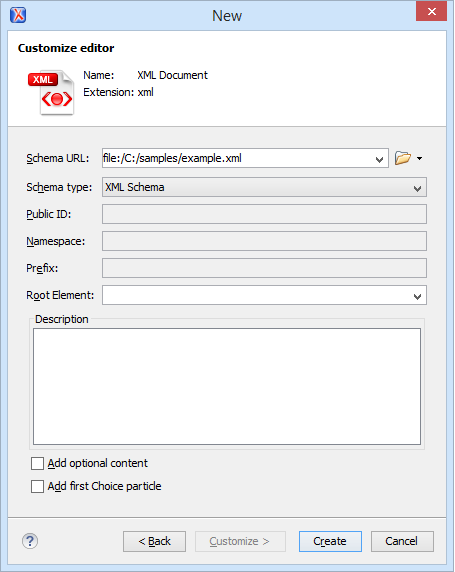
- Schema URL - Specifies the path to the schema file. When you select a file, Oxygen XML Editor analyzes its content and tries to fill the rest of the dialog box.
- Schema type - Allows you to select the schema type. The following options are available: XML Schema, DTD, RelaxNG XML syntax, RelaxNG compact syntax, and NVDL.
- Public ID - Specifies the PUBLIC identifier declared in the document prolog.
- Namespace - Specifies the document namespace.
- Prefix - Specifies the prefix for the namespace of the document root.
- Root Element - Populated with elements defined in the specified schema, enables selection of the element used as document root.
- Description - Shows a small description of the selected document root.
- Add optional content - If you select this option, the elements, and attributes defined in the XML Schema as optional, are generated in the skeleton XML document.
- Add first Choice particle - If you select this option, Oxygen XML Editor generates the first element of an xs:choice schema element in the skeleton XML document. Oxygen XML Editor creates this document in a new editor panel when you click OK.
-
Figure: New XSL Document Dialog Box
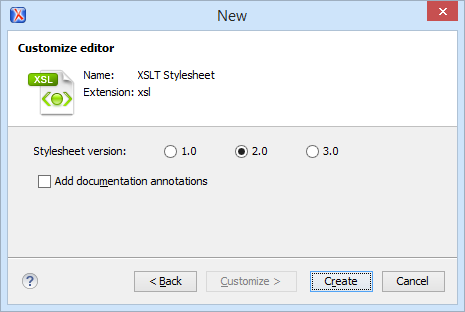
- Stylesheet version - Allows you to select the Stylesheet version number. You can select from: 1.0, 2.0, and 3.0.
- Add documentation annotations - Enable this option to generate the stylesheet documentation.
-
Figure: New XML Schema Document Dialog Box
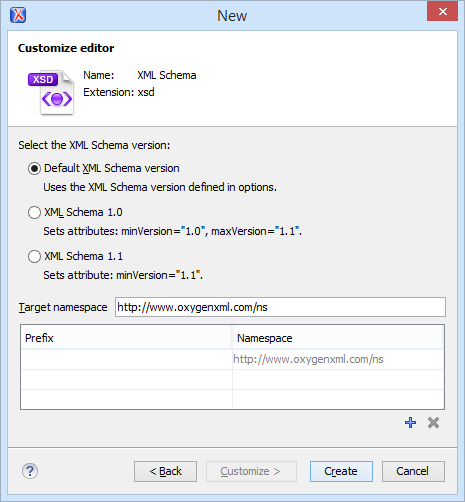
- Default XML Schema version - Uses the XML Schema version defined in the XML Schema preferences page.
- XML Schema 1.0 - Sets the minVersion attribute to 1.0 and the maxVersion attribute to 1.1.
- XML Schema 1.1 - Sets the minVersion attribute to 1.1.
- Target namespace - specifies the schema target namespace.
- Namespace prefix declaration table - contains namespace
prefix declarations. Table information can be managed using the
 New and
 Delete buttons.Tip: For further details on how you can set the version of an XML Schema, go to Setting the XML Schema Version.
-
Figure: New Schematron Document Dialog Box
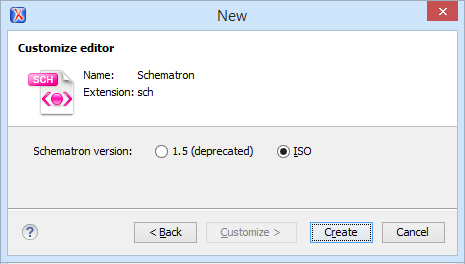
- Schematron version - Specifies the Schematron version.
Possible options: 1.5 and ISO.Note: Starting with version 16.0 of Oxygen XML Editor, the support for Schematron 1.5 is deprecated. It is recommended to use ISO Schematron instead.
To easily create a Schematron document the application offers two predefined document templates, ISO Schematron and Schematron 1.5.
- Schematron version - Specifies the Schematron version.
Possible options: 1.5 and ISO.
-