Our website uses cookies.
Find out more about cookies.
I understand. Hide this message.
Working with the XSLT / XQuery Debugger
Using Breakpoints
Parent topic
:
Using Breakpoints
Previous topic
:
Using Breakpoints
Next topic
:
Removing Breakpoints
Inserting Breakpoints
To insert a breakpoint, follow these steps:
Click the line where you want to insert the breakpoint in the XML source document or the XSLT/XQuery document.
You can only set breakpoints on the XML source in XSLT or XQuery debugging sessions.
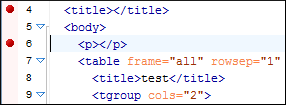
Breakpoints are automatically created on the ending line of a start tag, even if you click a different line.
Click the vertical stripe on the left side of the editor panel
or select
Create Breakpoint (
Shift+F7
)
from the
Edit
>
Breakpoints
menu
.
Breakpoints