The steps for importing the data from a relational database table are the
following:
-
Go to menu
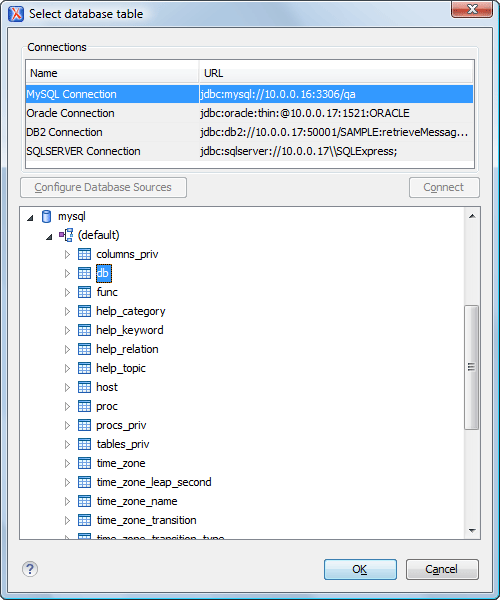
Clicking this action opens a dialog box with all the defined database connections:
Figure: Select Database Table Dialog Box
-
Click the OK button.
The Import Criteria dialog box opens with a default query string in the SQL Query pane:
Figure: Import from Database Criteria Dialog Box
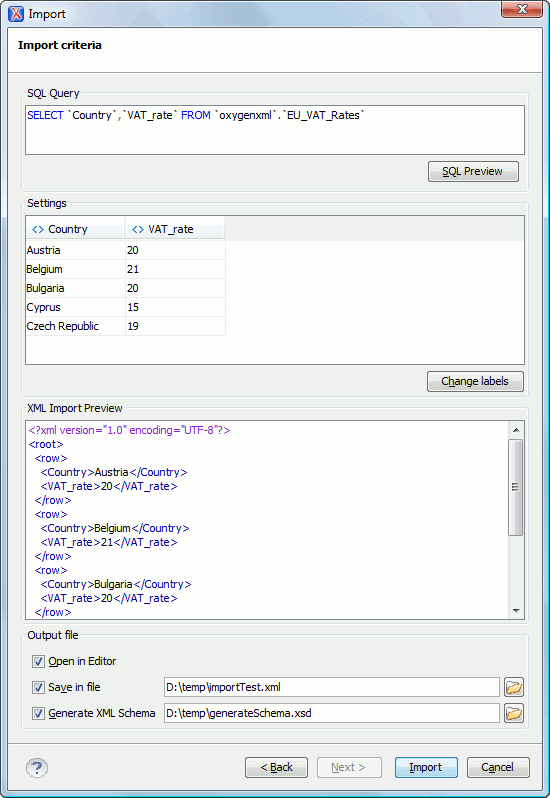
The dialog box contains the following options:
- SQL Preview - If the SQL Preview
button is pressed, the Settings pane displays the labels that are used in the XML document and
the first five lines from the database. By default, all data items in the input are
converted to element content, but this can be overridden by clicking the individual
column headers. Clicking once on a column header causes the data from this column to
be used as attribute values of the row elements. Click a second time and the data from
that column is ignored when generating the XML file. You can cycle through these
options by continuing to click the column header. The following symbols are used in
the column header to indicate the type of content the column is converted to:
- <> - data columns converted to element content
- = - data columns converted to attribute content
- x - ignored data
- Change labels - This button opens a new dialog box that allows you to edit the names of the root and row elements, change the XML name, and change the conversion criterion. The XML names can be edited by double-clicking the desired item and entering the required label. The conversion criterion can also be modified by selecting ELEMENT, ATTRIBUTE, or SKIPPED from the drop-down list.
- Open in editor - If checked, the new XML document that is created from the imported text file, is opened in the editor.
- Save in file - If checked, the new
XML document is saved at the specified path.Note: If this option is unchecked, while Open in editor is checked, the newly created document is opened in the editor as an unsaved file.
- Generate XML Schema - Allows you to specify the path of the generated XML Schema file.
- SQL Preview - If the SQL Preview
button is pressed, the Settings pane displays the labels that are used in the XML document and
the first five lines from the database. By default, all data items in the input are
converted to element content, but this can be overridden by clicking the individual
column headers. Clicking once on a column header causes the data from this column to
be used as attribute values of the row elements. Click a second time and the data from
that column is ignored when generating the XML file. You can cycle through these
options by continuing to click the column header. The following symbols are used in
the column header to indicate the type of content the column is converted to: