You can select the type of signature to be used for documents from a signature settings dialog box. To open this dialog box, select the Sign... action from the Source submenu when invoking the contextual menu in Text mode or from the Tools menu.
Figure: Signature Settings Dialog Box
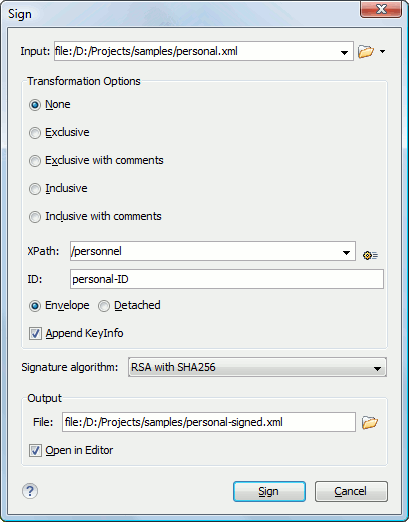
The following options are available:
- Input - Specifies the location of the input URL.
- Transformation Options:
- None - If selected, no canonicalization algorithm is used.
- Exclusive - If selected, the exclusive (uncommented) canonicalization method is used.
- Exclusive with comments - If selected, the exclusive with comments canonicalization method is used.
- Inclusive - If selected, the inclusive (uncommented) canonicalization method is used.
- Inclusive with comments - If selected, the inclusive with comments canonicalization method is used.
- XPath - The XPath expression provides the fragments of the XML document to be signed.
- ID - Provides ID of the XML element to be signed.
- Envelope - If selected, the enveloped signature is used.
- Detached - If selected, the detached signature is used.
- Append KeyInfo - If this option is checked, the ds:KeyInfo element will be added in the signed document.
- Signature algorithm - The algorithm used for signing the document. The following options are available: RSA with SHA1, RSA with SHA256, RSA with SHA384, and RSA with SHA512.
- Output - Specifies the path of the output file where the signed XML document will be saved.
- Open in editor - If checked, the output file will be opened in the editor.
Note: If Oxygen XML Author could not find a valid certificate, a link is provided at the
top of the dialog box that opens the XML Signing
Certificates preferences page where you can configure a valid certificate.
