The Insert Content Reference dialog box lets you reuse content by
inserting references to the DITA elements that hold the content you want to reuse.
Note: To
reference the content inside a DITA element you first have to set an ID for that
element.
The DITA conref attribute provides a mechanism for reuse of content fragments. The conref attribute stores a reference to another element and is processed to replace the referencing element with the referenced element. The element containing the content reference acts as a placeholder for the referenced element. The identifier for the referenced element must be either absolute or resolvable in the context of the referencing element. For more details, go to http://docs.oasis-open.org/dita/v1.0/archspec/conref.html.
Oxygen XML Author displays the referenced content of a DITA conref if it can resolve it to a valid resource. If you have URI's instead of local paths in the XML documents and your DITA OT transformation needs an XML catalog to map the URI's to local paths you have to add the catalog to Oxygen XML Author. If the URI's can be resolved, the referenced content is displayed in the Author mode and in the transformation output.
To open the Insert Content Reference dialog box, do one of the following:
- Go to DITA >
 Insert a DITA
Content Reference.
Insert a DITA
Content Reference. - Click the
 Insert a
DITA Content Reference action on the main toolbar.
Insert a
DITA Content Reference action on the main toolbar. - In the contextual menu of the editing area, go to Reuse > Insert a DITA
Content Reference.
Figure: The Insert Content Reference Dialog Box
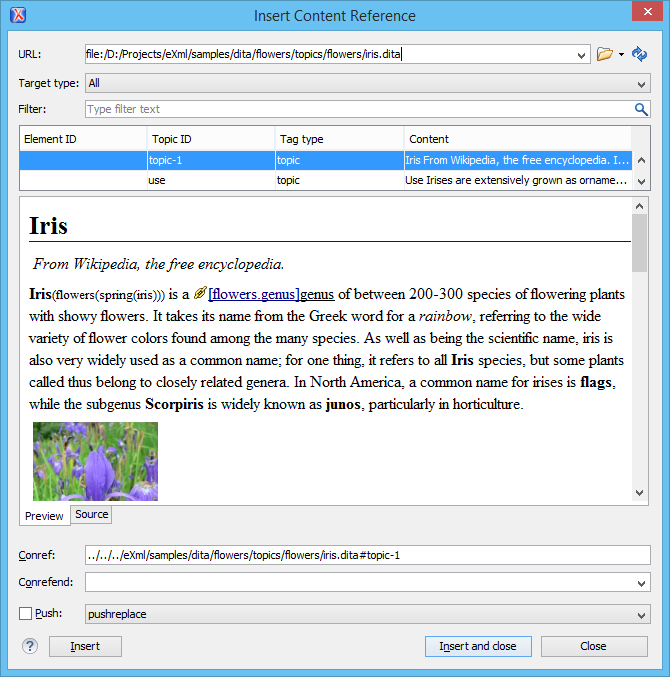
Note: The Insert Content Reference dialog box is not modal. The dialog
box is closed automatically if you switch to a different editor.
The following fields are available in this dialog box:
- URL - specifies the path to the topic that holds the content you want to reference.
- Target type - specifies the type of the element to which you are targeting your conref.
- Target ID - presents all the element IDs defined in the source topic.
- Preview - displays a preview of the content in the element that you select in the Target ID list.
- Source - displays the source of the element your want to reference.
- Conref - displays the value of the attribute.
- Conrefend - in case you select an interval of elements, this field displays the end value of the conref attribute.
- Push - this option enables you to push content into DITA topics and maps, provided that the topics and maps contain elements with id attributes that identify the places where the content is to be pushed.