Oxygen XML Author supports a wide range of document types. The New Document wizard presents the default associations between a file extension and the type of editor that opens the file. To customize these default associations, open the Preferences dialog box and go to .
-
To create a document in Oxygen XML Author, either select , or click the
 New button on the toolbar.
Oxygen XML Author displays the New Document wizard and groups the supported document types in multiple categories:
New button on the toolbar.
Oxygen XML Author displays the New Document wizard and groups the supported document types in multiple categories:- Recently used - Contains the list of the most recently used files.
- New Document - Contains the list of all supported document types. This list includes XML, CSS, Text, PHP, JavaScript.
- Global templates - contains the list of predefined templates as well as templates defined in the Document Templates preferences page.
- Framework templates - contains the list of templates defined in the Document Type Association preferences page, Templates tab.
-
If you select Customize, Oxygen XML Author
opens the following dialog box. You can customize different options depending on
the document type you select.
-
Figure: New XML Document Dialog Box
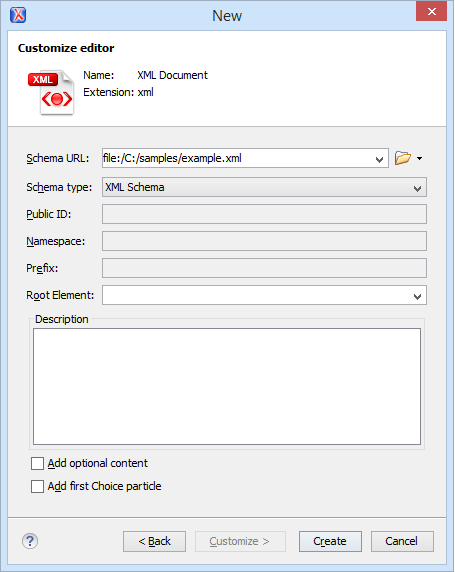
- Schema URL - Specifies the path to the schema file. When you select a file, Oxygen XML Author analyzes its content and tries to fill the rest of the dialog box.
- Schema type - Allows you to select the schema type. The following options are available: XML Schema, DTD, RelaxNG XML syntax, RelaxNG compact syntax, and NVDL.
- Public ID - Specifies the PUBLIC identifier declared in the document prolog.
- Namespace - Specifies the document namespace.
- Prefix - Specifies the prefix for the namespace of the document root.
- Root Element - Populated with elements defined in the specified schema, enables selection of the element used as document root.
- Description - Shows a small description of the selected document root.
- Add optional content - If you select this option, the elements, and attributes defined in the XML Schema as optional, are generated in the skeleton XML document.
- Add first Choice particle - If you select this option, Oxygen XML Author generates the first element of an xs:choice schema element in the skeleton XML document. Oxygen XML Author creates this document in a new editor panel when you click OK.
-